Disclaimer: Green Mountain IT Solutions and this website DO NOT provide medical advice. All content is provided for informational purposes and is not intended as a substitute for medical advice or the advice of a physician. Reliance on this information is at your own risk.
Have you been doing some extra cleaning lately? With the rapid spread of COVID-19, folks are scrubbing and sanitizing everything in site. The next time you go on a cleaning spree, don’t overlook devices like laptops, smartphones, and tablets. Electronics can be some of the dirtiest objects in our homes and offices, as well as some of the most frequently touched. They can also be a little tricky to clean. Read on for some tips on how to keep your gadgets germ-free.
Cleaning Supplies
To thoroughly clean your electronics, you’ll need the following:
- Isopropyl Alcohol, 91% strength. Often called rubbing alcohol, isopropyl alcohol is available in the first aid section at the pharmacy. Be sure to get the 91% grade. Lower concentrations will not dry as quickly and don’t kill as many germs. This is the best cleaner for electronics because it dries quickly and leaves no residue. Strong isopropyl alcohol also kills germs, including the virus that causes COVID-19.
- Dish Detergent. Though you should use alcohol whenever possible, really greasy or dirty devices may need a small drop of dish soap mixed into a little water to remove the grime. Use as little of this mix as possible and let your device dry thoroughly after use.
- Canned Air or an Air Compressor: Canned air is available at office supply stores and can be used to blow dust and debris out of tight spaces, especially between keyboard keys. If you have access to an air compressor with a blower nozzle, that’s even better. Be careful, though: compressed and canned air can sometimes contain water.
- Q-Tips. Cotton swabs are great for getting into those little nooks and crannies on a device.
- Microfiber cloth. A microfiber cloth is designed to be lint-free and is available at most department stores and auto parts shops. If you don’t have access to one, it is OK to use paper towels or a rag. Pro tip: you can also use a flannel shirt to remove smudges and streaks on your screen. Good old-fashioned newspaper works well, too– just ask your grandmother!
- Toothbrush. A toothbrush, preferably a new and clean one (check dollar and discount stores), is the perfect thing for cleaning tricky spaces, especially laptop keyboards.
Check the auto parts store if you have trouble finding microfiber towels.
Caution! Don’t Fry Your Device!
Cleaning electronics presents a dilemma: Liquids and electronics don’t mix, but we need some liquid to clean them. Follow these steps to make sure you don’t damage your devices when cleaning.
- UNPLUG EVERYTHING. This includes chargers, power cords, keyboards and mice, and other accessories. Anything than can be unplugged should be unplugged during cleaning.
- TURN EVERYTHING OFF. If your device has a built in battery, such as on a smartphone or laptop, turn it all the way off. Most smartphones are turned off by holding the power button down for a few seconds.
- DRAIN THE POWER: Obviously, if you’ve unplugged a desktop computer, it’s off, but you should also hold down the power button for 5 seconds to drain any residual power from the system. This step does not apply to smartphones and laptops, which will turn back on if your press the power button.
- REMOVE THE BATTERY (if possible): These days, most smartphone and laptop batteries are not removable. If this is the case, you’ll need to be extra-careful when cleaning. If you are lucky enough to have a removable battery, go ahead and remove it, then hold down the power button for 5 seconds to drain any leftover power. Devices with removable batteries (or unplugged devices with no battery at all) can safely be cleaned thoroughly as long as they are left to dry completely before being turned back on.
- EASY ON THE LIQUID: Never pour cleaning liquids directly onto your device. Instead, apply the cleaner to your cloth. Be sure to use as little liquid as possible.
- LET IT DRY: You should plan to leave your device to dry for at least 30 minutes after cleaning before turning it back on. If you have used anything other than isopropyl alcohol to clean, increase the drying time to a few hours. If you accidentally used too much liquid or used a lot of water-base cleaner, leave the device to dry overnight.
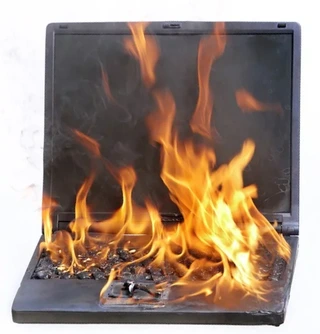
Don’t do this! Unplug your device, shut it off, and use minimal liquid when cleaning it.
Scrub Away
Once you know what supplies to use and how to avoid frying your device, the actual cleaning part is pretty self-explanatory. Just pour a small amount of alcohol on your cloth and go over your device carefully to clean it. You can work a Q-Tip or toothbrush into any tight crevices.
If you’re using canned or compressed air, start with that. You don’t want to clean your laptop’s surfaces just to spray dust everywhere when you hit the keyboard with the air. You can also blow out the device’s USB ports and vents. You might want to work the canned air in tandem with a toothbrush or Q-Tip to loosen any debris first, then blow it away.
Cleaning Screens
Screens can be difficult to clean perfectly, so they deserve their own section. Follow these steps for a spotless, streak-free clean:
- Use isopropyl alcohol or a small amount of water on your screen. Avoid Windex! Ammonia-based cleaners can damage the anti-glare coatings on many screens.
- Use a microfiber cloth to avoid streaks. Believe it or not, newspaper also works well to avoid streaking.
- A flannel shirt can be used to polish away any stubborn smudges, but be careful not to over-do it. The abrasive flannel can damage your screen.
Apply Often
As the COVID-19 pandemic intensifies, experts are recommending that folks clean their devices as many times a day as possible. If you are still working in the office, it’s suggested you get into the routine of disconnecting your mouse and keyboard (or shutting down your laptop) and wiping them down with alcohol whenever you take a break. If you share a computer with anyone, wipe down the mouse and keyboard whenever you walk away.
That does it for this week’s article on cleaning and sanitizing your electronic devices. Thanks for reading, and stay healthy!
