Before hiring Green Mountain IT, Wiemann-Lamphere Architects’ entire business was unknowingly on the brink of catastrophic data loss.
Wiemann-Lamphere Architects (WLA) is a leading architectural firm based in Colchester, Vermont. For many years, WLA relied on in-house IT support. When their in-house IT person left the firm for another opportunity, WLA reached out to Green Mountain IT Solutions for contracted support – not a moment too soon, it turned out!
Like many architectural firms, WLA still relied on traditional on-premises servers to store their data. Architectural design files, such as from Autodesk Revit, can be large and aren’t always well-suited to the cloud systems used by other businesses.
When we take on a new client at Green Mountain IT, we begin with a full technical discovery process to become familiar with the new account’s systems. One of the first things we check is backups: is everything being backed up properly, and are the backups actually working?
Just a few minutes into WLA’s discovery, it became clear that something was very, very wrong. Well, two things, actually:
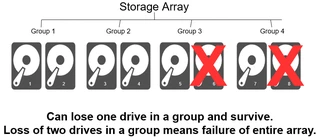
WLA’s server was configured with an array of 16 disks in RAID10 format. This means that that the 16 disks were divided into 8 groups of 2 disks each. Each group could tolerate the loss of 1 disk, but not both. Any group losing both its disks would mean total loss of all data.
On WLA’s server, the disk pairs were laid out like this:
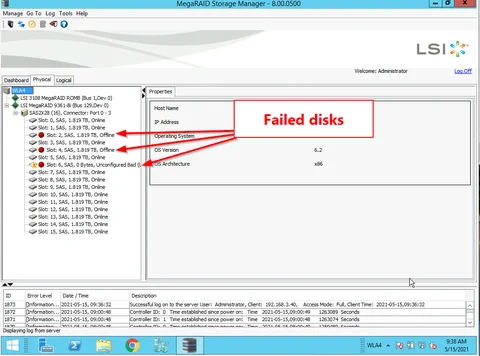
During discovery, our team found that disks 2, 4, and 6 had failed. This was fortunate, since no two of the failed disks were in the same group. If disks 2 and 3 had both failed, for example, everything would have been lost.
So, the server was still up and running, but the risk of a critical failure and total loss was still very high. Two factors that increased the risk were:
Despite the risks, something had to be done, so we pressed on.
Our first goal was to take a backup of the system. However, the stress of taking a full backup could damage the array further. To be as gentle as possible on the failing array, we scheduled an after-hours maintenance where we shut down the server and carefully took a complete image of the entire array. Unlike normal backup software, the imaging process was able to read the disks gently and avoid stressing potentially damaged sections.
After the imaging process ran overnight, we began replacing the failed disks. Luckily, the replacements went off without a hitch.
Finally, with the array up and running smoothly, we were able to install normal backup software and take a full backup of the system, plus schedule backups to run every few hours moving forward. At last, WLA’s data was safe!
This was definitely a nerve-wracking effort. At any moment, another disk could have failed, causing total loss of the firm’s data. However, a fix had to be made, or eventual failure would become inevitable. To paraphrase something one of the firm’s partners said during a briefing on the issue:
It was like performing life-saving surgery on a patient who might not survive the operation—but doing nothing guaranteed death.
A few major lessons were learned from this incident:
Are your servers healthy? Are your backups working? Don’t wait for a crisis. Contact Green Mountain IT Solutions today for a free IT consultation.
